
Invitation-only professional beta

From tender documents to a bid you can stand behind.

TenderLine reads the tender package, builds the compliance matrix, costs the job, proposes the P&L and fills the client's own forms. The AI proposes, you confirm, and anything it is unsure about is flagged for review instead of guessed.

We are inviting experienced tender, commercial and operations professionals in oilfield services to try TenderLine on their own work and tell us what to fix, change or add.

TenderLine title plate: slickline rig-up, wellhead and a sectioned jar drawn as an engineering plateFIG. 1 — TenderLine

In beta

TenderLine — the tender workbench

Built first for slickline, wireline and well-intervention tenders. Drop in the client's package and work through it in 17 steps, from reading the documents to the executive summary, on your own computer with your tenders in a folder you choose.

1

Reads the whole package

Upload the tender documents. TenderLine extracts requirements and cross-checks the documents against each other, so conflicts and gaps surface early.

2

Compliance, clarifications, exceptions

A compliance matrix clause by clause, with proposed clarification questions and exceptions you can accept, edit or reject.

3

Fills the client's own forms

The client's format always prevails. TenderLine fills the pricing schedule and form documents in their original layout, down to boxes inside a heading.

4

Costs the job

Equipment and tool worksheets, staffing plans with rotations and rosters, mobilisation, and a cost roll-up that feeds the commercial offer.

5

Standard proposed P&L

A GAAP-style layout with training, certifications, accommodation, camp, travel, rentals, subcontractors and more, plus your own free lines. Export it as an Excel working model with live formulas.

6

Reviewed, not guessed

Nothing is invented. Where the AI is uncertain it raises a review flag, and an AI check pass helps you before you submit.

A tour of the screens

What the work looks like

TenderLine — Example tender (demo data)
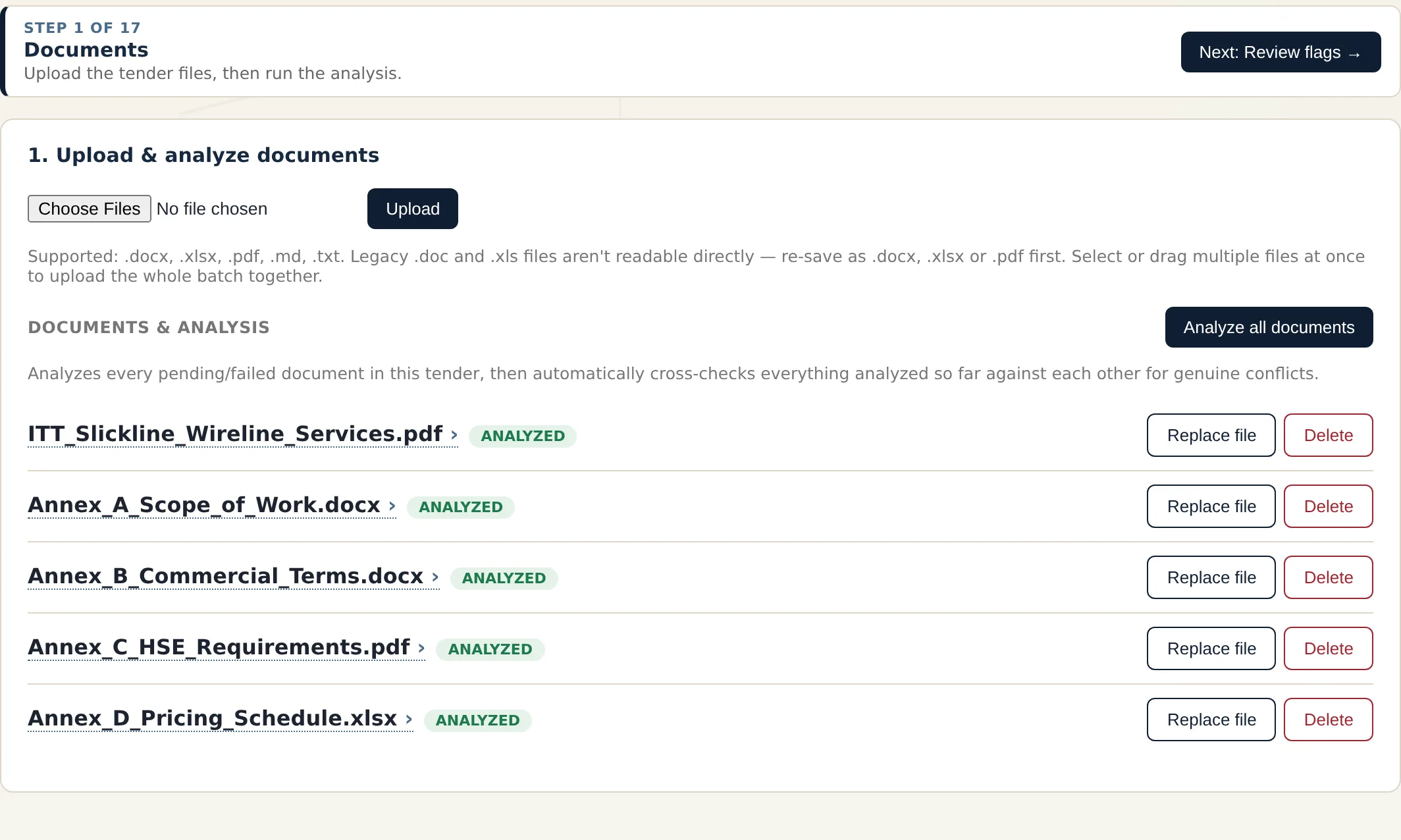
TenderLine screen: Step 1 · Documents
Step 1 · Documents

Drop in the whole tender package

Upload the client's documents in one batch and let TenderLine read them. It then cross-checks everything it has analysed against each other for genuine conflicts, so the contradictions surface before you price, not after you submit.

  • Word, Excel, PDF, Markdown and text files, many at a time
  • One click analyses every pending document
  • Replace a file when the client issues an addendum
TenderLine — Example tender (demo data)
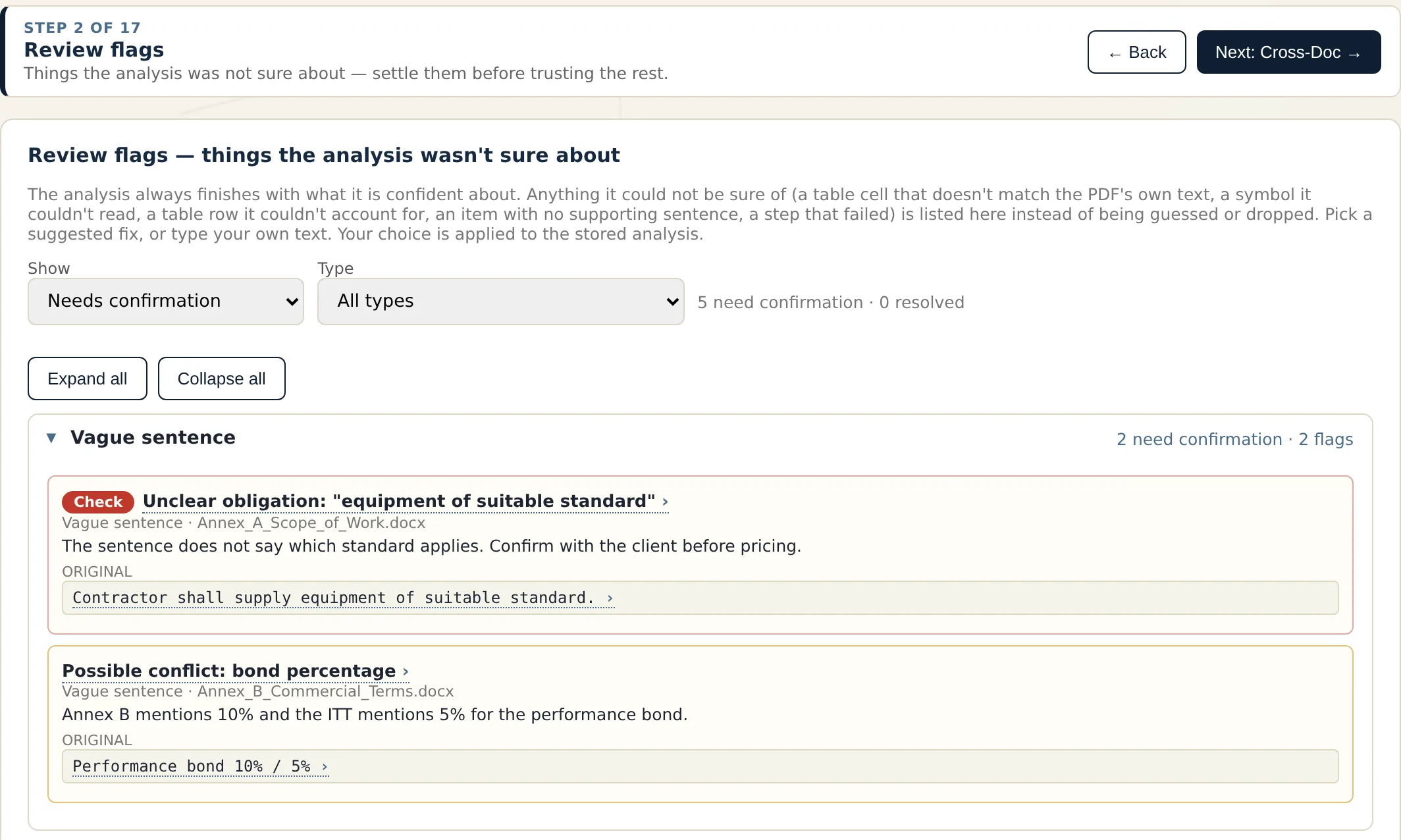
TenderLine screen: Step 2 · Review flags
Step 2 · Review flags

Nothing guessed, nothing dropped

Whatever the analysis is not sure about, such as a vague sentence, a table it could not classify or an item that does not match its row, lands on a review list instead of being guessed. You pick a suggested fix or type your own, and your choice is applied.

  • Grouped by type and priority so the risky ones come first
  • Original text shown beside the proposed reading
  • Resolved flags stay on record
TenderLine — Example tender (demo data)
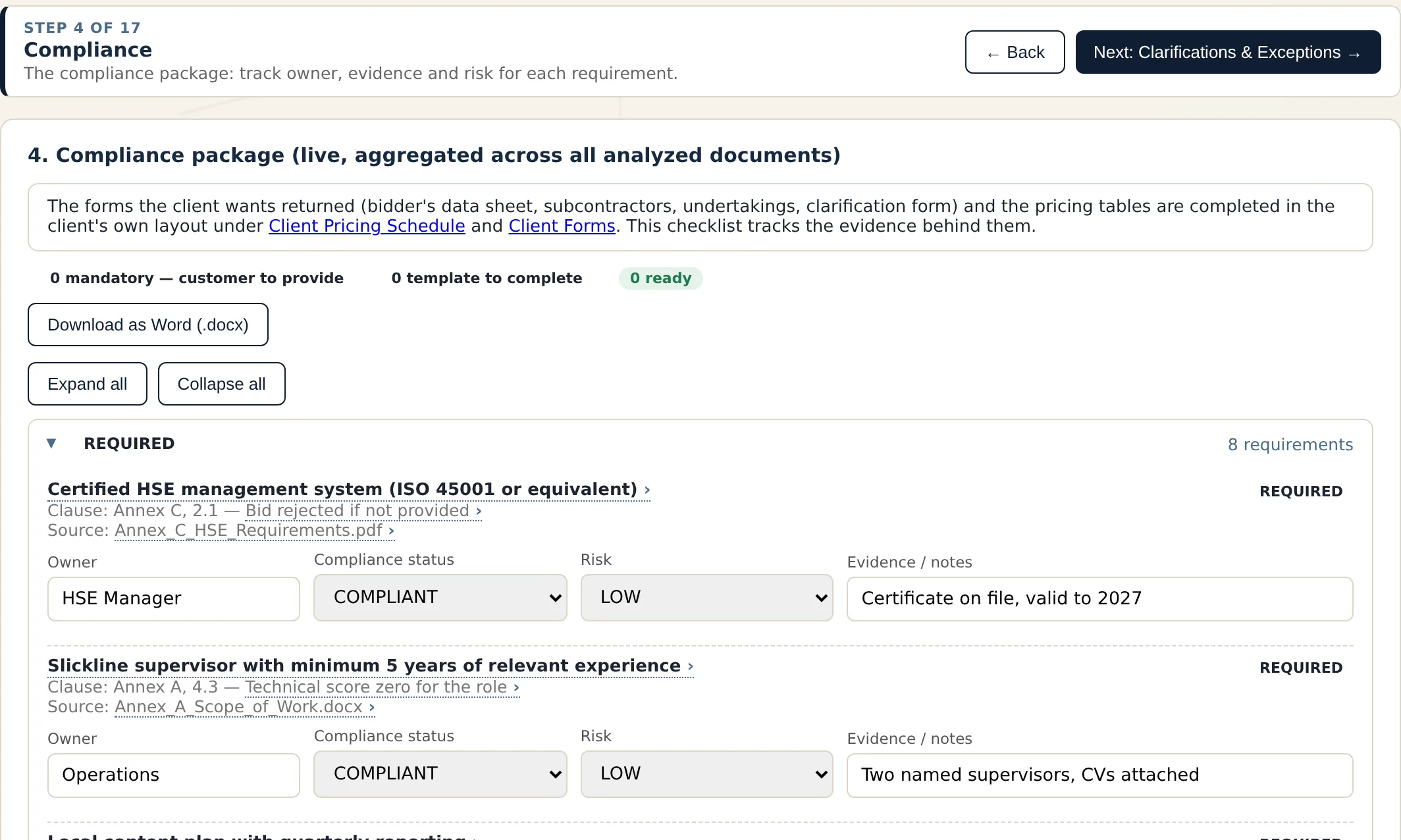
TenderLine screen: Step 4 · Compliance
Step 4 · Compliance

A compliance matrix you can actually run

Every requirement is traced to its clause and source document, with the consequence of getting it wrong. Give each one an owner, a status, a risk level and the evidence behind it, and download the whole package as a Word file.

  • Clause reference and disqualification consequence per requirement
  • Owner, compliance status, risk and evidence notes
  • Pending, partial and non-compliant items are easy to spot
TenderLine — Example tender (demo data)
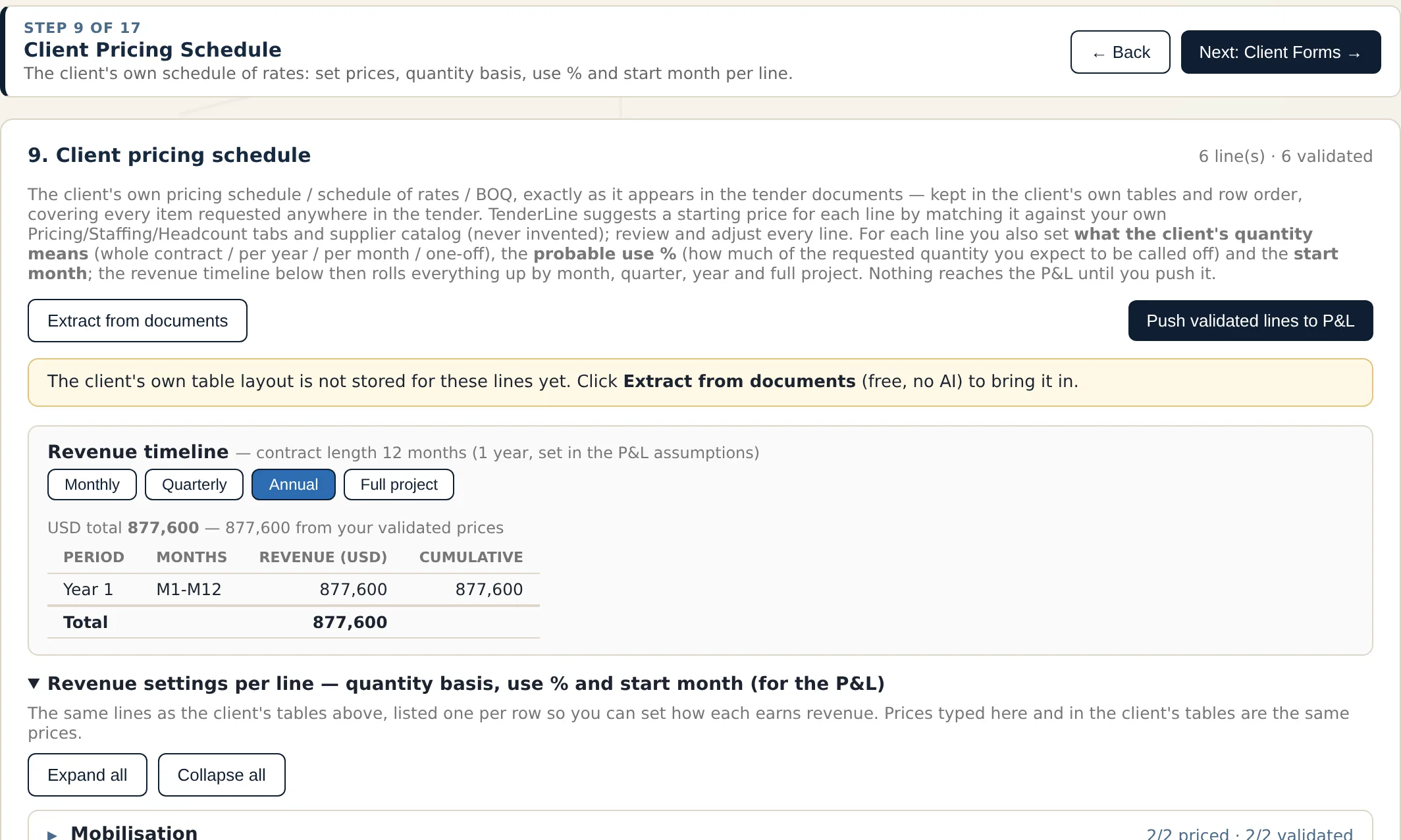
TenderLine screen: Step 9 · Client pricing schedule
Step 9 · Client pricing schedule

The client's schedule, in the client's layout

TenderLine keeps the pricing schedule exactly as the client issued it, line by line. Starting prices come from your own pricing and staffing tabs and your supplier catalogue, never from invention. You set how the client's quantity is meant, how much you expect to use and when it starts.

  • Revenue timeline by month, quarter, year or full project
  • Quantity basis, probable use % and start month per line
  • Nothing reaches the P&L until you push it
TenderLine — Example tender (demo data)
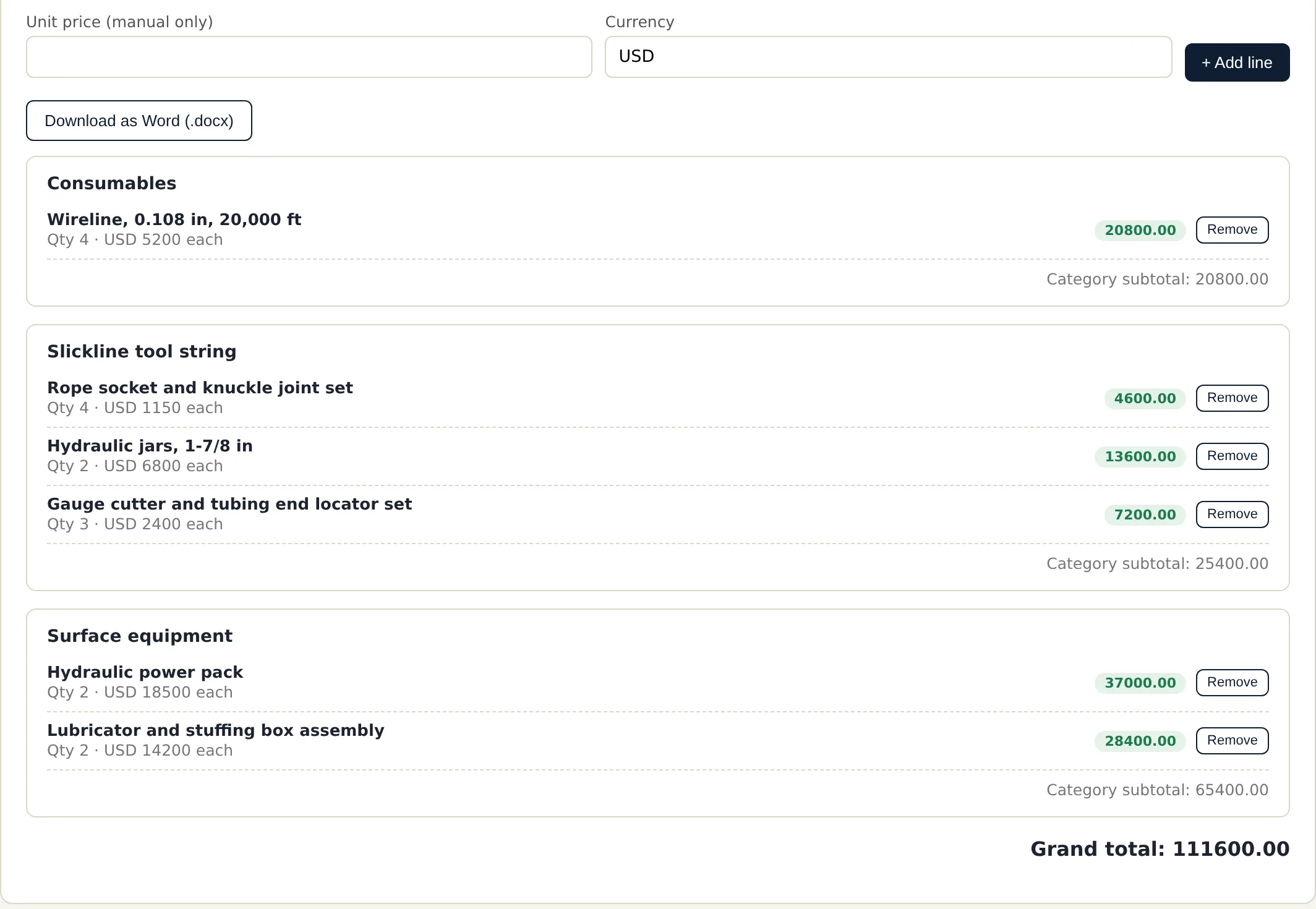
TenderLine screen: Step 11 · Pricing
Step 11 · Pricing

Equipment and tool worksheet

Build the equipment and consumables list by category, with quantity and unit price per line and a subtotal for each category. The totals feed the cost roll-up and can be downloaded as a Word document for the offer.

  • Category subtotals and a grand total
  • Lines from your catalogue or typed by hand
  • Prices are entered by you, never invented
TenderLine — Example tender (demo data)
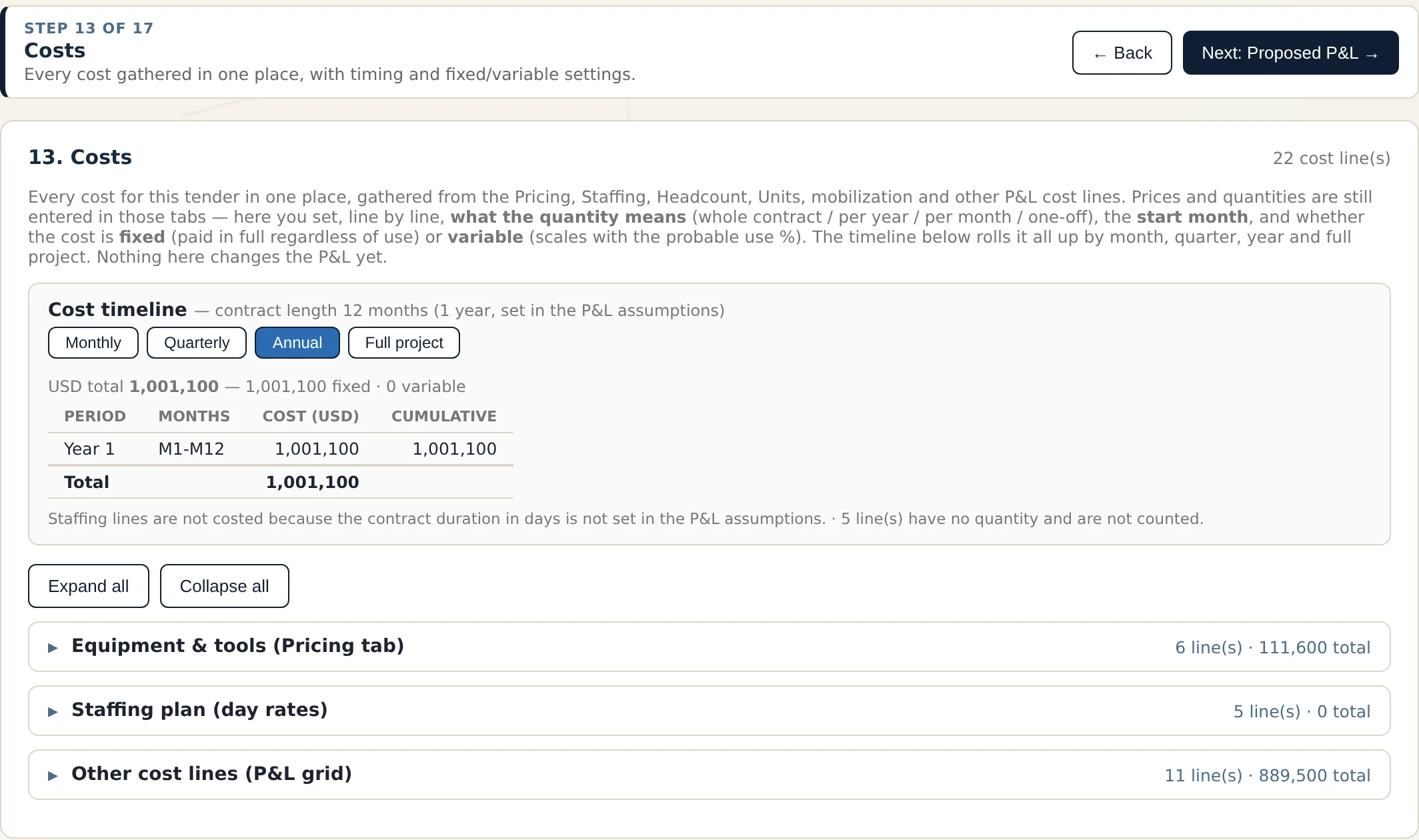
TenderLine screen: Step 13 · Costs
Step 13 · Costs

Every cost in one place

Equipment, staffing, mobilisation and the other cost lines are gathered on one screen. Mark each as fixed or variable, set when it starts, and see the whole thing rolled up by month, quarter, year or for the full project.

  • Fixed versus variable behaviour per line
  • Timeline view across the contract
  • Warns when something is missing, such as no contract duration for staffing
TenderLine — Example tender (demo data)
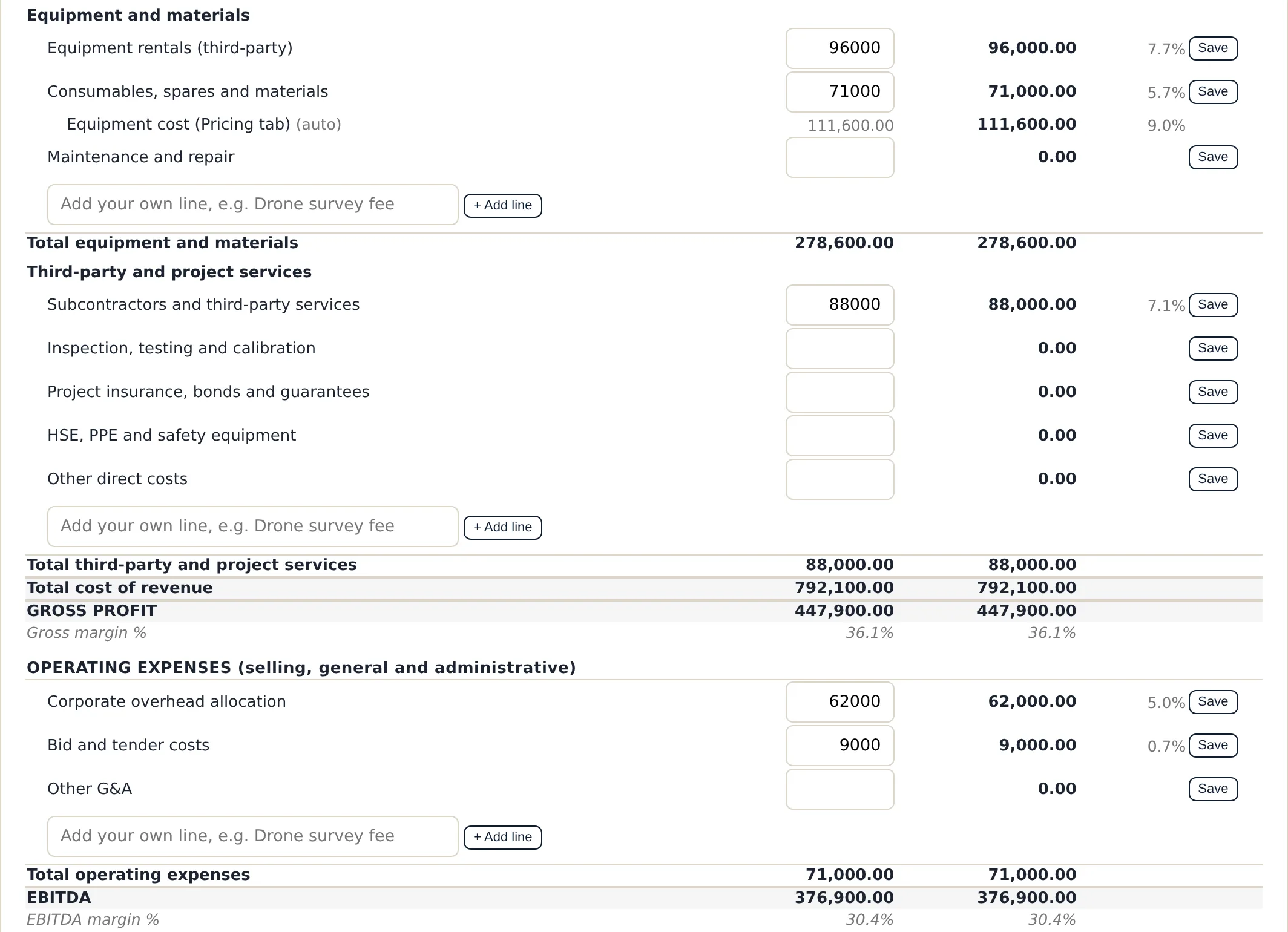
TenderLine screen: Step 14 · Proposed P&L
Step 14 · Proposed P&L

A standard P&L, with room for your own lines

A GAAP-style layout from revenue through cost of revenue, gross profit, operating expenses and EBITDA, with the lines oilfield bids really have: training, certifications, accommodation, camp, travel, rentals, subcontractors and more. Add your own line to any group, then download an Excel working model with live formulas.

  • Standard lines plus your own free lines in every group
  • Gross margin and EBITDA margin calculated for you
  • Excel working model with monthly, quarterly and annual views
TenderLine — Example tender (demo data)
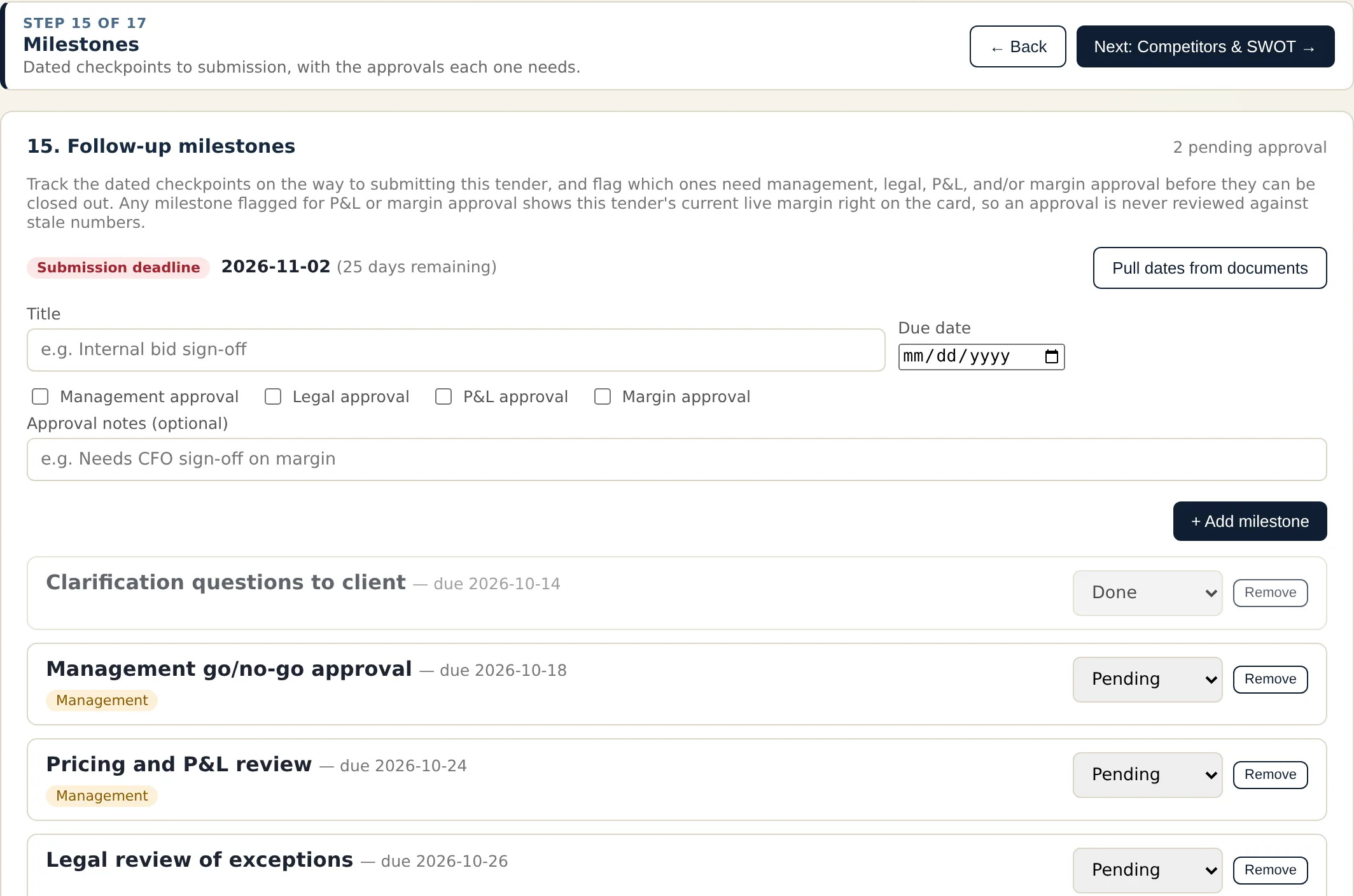
TenderLine screen: Step 15 · Milestones
Step 15 · Milestones

Dated checkpoints with the approvals each one needs

Track the road to submission, flag which checkpoints need management, legal, P&L or margin approval, and keep an eye on the countdown to the submission deadline. Pull the dates straight from the tender documents.

  • Submission deadline with days remaining
  • Approval flags per milestone
  • Dates can be pulled from the documents

Screens are from TenderLine running on an invented demo tender. The client, documents and figures are made up for illustration. Click a screen to enlarge it.

And the rest of the workbench

Cross-document check

Compares the documents against each other to find conflicts between them.

Clarifications and exceptions

Proposed questions and exceptions you accept, edit or reject.

Gap report

Shows what the tender asks for that you cannot yet meet.

Sourcing and RFQ

Matches equipment to supplier catalogues and drafts supplier requests.

Client forms

Fills the client's own forms in their layout, including boxes inside a heading.

Staffing and CVs

Day-rate staffing plans and a personnel roster, with CVs reformatted for the bid.

Competitors and SWOT

Record what you know about competitors and draft a SWOT for your bid.

Executive summary

A short PowerPoint built from everything entered and analysed.

AI check and search

A review pass before you submit, and search across the tender documents.

The beta

Try it on real work, then tell us straight

TenderLine is still being shaped, and the people who use it for a living are the best judges. Here is how the beta works.

  1. Ask for an invitation

    Fill in the short form below. We reply by email with a personal invitation code.

  2. Download and install

    Enter your code in the download section to get the Windows or Mac installer.

  3. Work a real tender

    Use your own tender documents. Everything stays on your computer; only the text of an AI step is sent for processing.

  4. Use the Feedback button

    Inside the app, press Feedback at any time. Say what is wrong, missing or good; your note reaches us with the screen you were on.

What we ask of testers

Run at least one real or realistic tender through the steps that matter to you, and send feedback as you go, even short notes. Bugs, unclear wording, missing features and ideas are all welcome.

What you get

Early access, a say in what gets built next, and direct contact with the person who builds it. Testers also get an extended trial period on request.

What to expect

This is a beta: you may meet rough edges. The app starts with a 14-day trial on each computer. Please keep client confidential details out of feedback messages.

Download

Enter your invitation code

The installers are only available to invited testers.

Windows may show a "Windows protected your PC" notice, and macOS may say it cannot verify the app, because the beta is not yet digitally signed. This is expected; each download comes with a short note on how to continue. Lost your code? Write to [email protected].

Join the beta

Request an invitation

Tell us a little about yourself. We read every request and reply by email.

Questions

Good to know

Where do my tender documents go?

TenderLine runs on your computer and keeps your tenders in a folder you choose. When AI analysis is used, the text needed for that step is sent to the AI service to be processed; your documents are not published or shared with other testers.

Does the AI make things up?

TenderLine is designed so the AI proposes and you confirm. It does not invent figures or clauses, and it raises a review flag when it is not sure. You stay responsible for what you submit, so check the result before it goes out.

What does the Feedback button send?

What you type, the type of note you chose, an optional star rating, the screen you were on, the app version and your computer type. If you choose, it also attaches a screenshot that you can see first, and your name, company and email so we can reply. It never sends your tender documents or project data.

How long can I use the beta?

TenderLine gives each computer a 14-day trial from the first time it is opened. If you need longer for a proper test, tell us and we will send a license key for your computer.

Which computers does it run on?

Windows 10 or 11 (64-bit), and Macs with macOS 13 or newer, both Intel and Apple Silicon.

Why does my computer warn me when I open it?

The beta installers are not yet digitally signed, so Windows and macOS show a caution notice for new software. The download section explains how to continue. We will sign the app before the public release.

Do I need my own AI key?

During the beta, TenderLine uses an Anthropic API key. You can enter your own in the app's settings, or write to us if you need help getting started.